Saturday, October 14, 2017

Why You Should Have Protonmail


When you communicate with others via e-mail, the content of your messages may be read or scanned by someone other than your intended recipient (the addressee). It should be no secret by now that many of the major e-mail providers scan the content of your private e-mail to provide targeted advertising to you, the user. E-mail services can be, and often are, hacked. The recent Yahoo e-mail hack is just one example (See: "Every single Yahoo account was hacked - 3 billion in all" CNN Money Oct 3, 2017) And for some there may be the concern of your e-mail being accessed through legal discovery, or search warrant.
 
Now while you may not care about some of the content of your e-mail being exposed, you no doubt have personal e-mail content that you don’t want shared with anyone other than the intended recipient. To protect your personal and private communications with close friends and family, it is important to get everyone to communicate through an end-to-end encrypted e-mail service. For this, I recommend that you get everyone to sign up for and use a ProtonMail account.
 
ProtonMail is an end-to-end encrypted email service founded in 2013 at the CERN research facility in Geneva, Switzerland. ProtonMail uses client-side encryption to protect email contents and user data before they are sent to ProtonMail servers, in contrast to other common email providers such as Gmail and Hotmail. The service can be accessed through a webmail client or dedicated iOS and Android apps.  
 
When communicating on the ProtonMail network all your communication between ProtonMail accounts is encrypted using PGP. You also have the ability to send encrypted e-mail to users of other services if you have a shared message password; but having all of your close friends and family using the ProtonMail network is a much more secure option.  
 
  • ProtonMail is incorporated in Switzerland and all our servers are located in Switzerland. This means all user data is protected by strict Swiss privacy laws.
  • All emails are secured automatically with end-to-end encryption. This means even ProtonMail cannot decrypt and read your emails. As a result, your encrypted emails cannot be shared with third parties.
  • No personal information is required to create your secure ProtonMail account. By default, ProtonMail does not keep any IP logs which can be linked to your anonymous email account.


Friday, October 13, 2017

Free Privacy & E-Security Books


In 1999, I published my first book Privacy for Sale. The following year, I published The Complete Guide to E-Security, and then in 2002, I published The Privacy Handbook. All three of these books were published by Paladin Press in Colorado. Unfortunately, Paladin Press will close its doors at the end of the year (2017) and these three books are no longer in print.
 
I am making a PDF copy of each of these books available for free to readers of my blog, Chesbro On Security. Just follow the links and download a copy from my Google Drive.
Some of the information in these books is outdated, some of my ideas at the time were well... pretty bad (although perhaps valid at the time); but much of the information in these books is still valid and applicable to personal privacy and security today. At a minimum, you can read my thoughts on privacy and e-security from 15-20 years ago, and compare it to my thoughts in this blog currently.


KeePassXC Password Manager 2.2


KeePassXC (KeePass Cross-Platform Edition) is a community fork of KeePassX, the cross-platform port of KeePass for Windows.
 
The database is encrypted with the industry-standard AES (alias Rijndael) encryption algorithm using a 256 bit key. And it is compatible with KeePass Password Safe.
 
KeePassXC features include:
  • Auto-Type on all three major platforms (Linux, Windows, OS X)
  • Twofish encryption
  • DEP and ASLR hardening
  • Stand-alone password and passphrase generator
  • Password strength meter
  • YubiKey challenge-response support for strengthening your database encryption key
  • a generator for time-based one-time passwords (TOTP)
  • a diceware password generator
  • a command line interface (CLI)
  • CSV database import
  • true portable mode with the config file residing in the same directory as the application
  • automatic database locking when you lock your desktop session


Thursday, October 12, 2017

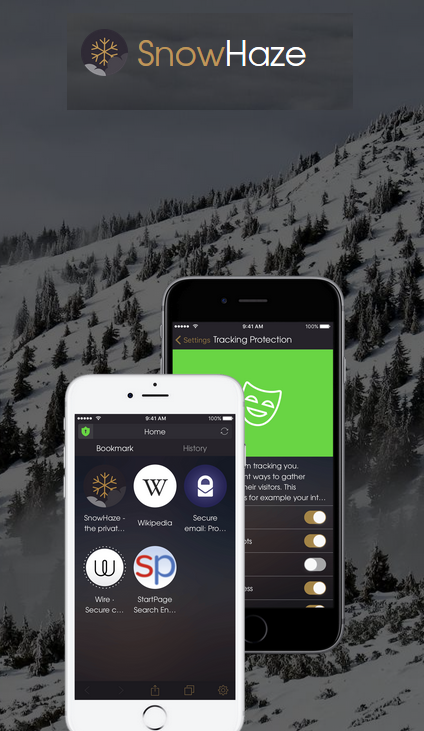
SnowHaze for iOS


SnowHaze is a powerful private browser developed to fully protect your data on the Internet. You can use SnowHaze on Apple iPhone, iPad and iPod Touch running iOS 9.2 or later. I use SnowHaze and recommend it as a replacement for the Safari browser.
 
Apple devices come with the Safari pre-installed, and you generally are not able to completely uninstall Safari from your iOS devices. You can however disable the Safari Browser by following these steps:
 
1: From your device's home screen, click  the Settings app
2: Scroll down and select General
3: Select Restrictions
4: Enter (or create) your restrictions passcode
5: Switch the toggle next to Safari to the OFF position

From the SnowHaze web-site... (https://snowhaze.com/en/)
 
"You are most probably not selling guns to Yemen over the Internet. However, already very basic information about you can be very harmful if it lands in the wrong hands. Your health data could be sold to an insurance company, which could deny selling you insurance. You could see more expensive flight tickets on the internet than your neighbor does because the site that is selling you the tickets already knows where you want to go. There are tons of more examples and the technology to analyze collected data is evolving at an incredible pace! While all popular browsers (Safari, Firefox, Chrome, etc.) offer functions that claim to protect your data ... well, they don't really. They erase your local data, but the much more harmful part on the internet stays there, easily accessible for everybody. This is why it is so important to protect your data. No browser entirely hides your activities on the internet (even TOR and SnowHaze do not), but we do everything to protect your data as well as we can. The technologies that SnowHaze uses are not new. But until now, it was too hard to set up, the interfaces were just ugly and the pages would not even load correctly. This is why we created SnowHaze - The first easy to use browser that really protects your data. Let us know what you think; we would love to hear your opinion!"


Cyber Self-Defense


Cybersecurity Attacks - The Insider Threat

 
Cybersecurity Attacks - The Insider Threat
http://www.cdse.edu/shorts/cybersecurity.html
 
A new (August 2017) course from CDSE. This short, 15 minute, course gives an overview of cyber attacks by insiders, and provides recommendations on how to mitigate those threats.


Wednesday, October 11, 2017

Secure E-mail Certificates

 
"A Secure E-mail certificate adds security and authenticity to your e-mail communications. Encryption keeps your e-mail private while digital signing ensures the integrity and authenticity of the message." ~ Comodo
 
One method of encrypting e-mail across multiple systems and with multiple users is through the use of digital certificates.  A digital certificate is a data file containing the necessary information for a user to sign, encrypt, and decrypt e-mail.  Digital certificates can be used with most any e-mail client that supports S/MIME (Secure/Multipurpose Internet Mail Extensions); such as Outlook, Netscape, Mac Mail, Thunderbird, and Eudora.  The advantage of this is that regardless of what e-mail system a person is using, it is usually possible to exchange encrypted e-mail through the use of digital certificates. 
 
To use digital certificates to encrypt e-mail it is first necessary to obtain a personal digital certificate.  Digital certificates are data files issued by certification authorities (CA). 
 
To obtain a personal digital certificate simply visit one of the certification authorities’ web-sites, fill out the certificate application and then download and install your digital certificate. A digital certificate may be associated with an e-mail address, or may be associated with a specific individual through the submission of identification documents to the certification authority when the digital certificate is requested. Digital certificates associated with an e-mail address may be available for free, while those associated with a specific individual through the submission of identification documents usually charge a small annual fee. For personal e-mail security, having the digital certificate associated with just an e-mail address may be sufficient, however individuals using digital signatures in a business or professional capacity may want to have their digital certificate associated to their personal identity as well. In either case the encryption is the same, and the digital certificates function in the same way.
 
Comodo offers a free secure e-mail certificate at:  https://www.comodo.com/home/email-security/free-email-certificate.php
 
Improve your digital security.  Get your personal secure e-mail certificate today.